
.avif)

.avif)


Engineering
·
January 28, 2026




When we decided to add Microsoft 365 support to Prowler OSS and Prowler Cloud, the goal was clear: provide real, production-ready security visibility for Microsoft 365, aligned with CIS benchmarks, and flexible enough to allow our customers and community to extend with new controls and compliance frameworks, that Prowler already offers for other providers.
At the beginning, the most obvious choice was Microsoft Graph API. In fact, Microsoft itself recommends using Graph as the primary way to interact programmatically with Microsoft 365 services, so it was both the logical and recommended starting point. Since Prowler is written in Python, integrating Graph felt like the natural path forward, and we started implementing our first checks using this approach.
However, after digging deeper, we quickly ran into a limitation: Microsoft Graph only allowed us to cover around 10% of the CIS requirements. This meant that relying on Graph alone would leave the majority of security-relevant configurations unchecked, making it impossible to deliver a trustworthy assessment.
At that point, we started exploring other options.
The two main paths we considered were:
We decided to try the second approach first, mostly to avoid having to deal with PowerShell at all. But it soon became clear that this path was not viable. From an architectural perspective it was messy, authentication was inconsistent when used programmatically, and the endpoints themselves were not designed to support a clean integration.
So we ended up making a decision that, for many engineers — quite logically and fairly — sounds like a terrible idea at first:
running PowerShell from Python using subprocess.

If you ask an engineer what they think about executing PowerShell sessions from a Python CLI via subprocess… they probably won’t respond with excitement. In fact, they’ll likely look at you with a very concerned expression.
After a fair amount of internal debate — and many “are we really doing this?” moments — we decided to move forward.
But doing this safely meant solving two key problems: memory management and security.
Spawning subprocesses without control can easily lead to orphaned processes and memory leaks.
To avoid this, we designed a session-based model per service. During a Prowler execution, a single PowerShell session is opened for the service being analyzed, used to retrieve the required information, and then closed once the data collection is complete.
We also implemented strict execution timeouts to ensure that no session could run indefinitely.
The bigger concern was command injection, especially in production environments or CI/CD pipelines.
To mitigate this risk, we implemented multiple protection layers:
This was particularly challenging when our authentication method still supported username and password, because passwords can contain a wide range of characters. Today we rely on secrets and certificates, which makes things simpler, but back then the sanitization logic required careful design.
Another challenge was authentication persistence. Many Microsoft 365 operations require authenticating through specific PowerShell modules (for example, Exchange or Teams). Normally, you authenticate once and then execute multiple queries within the same session. However, when using independent subprocess calls, every command starts a new PowerShell process. This creates a logical loop: you can authenticate in one call or run a query in another, but the authentication state is lost between them.
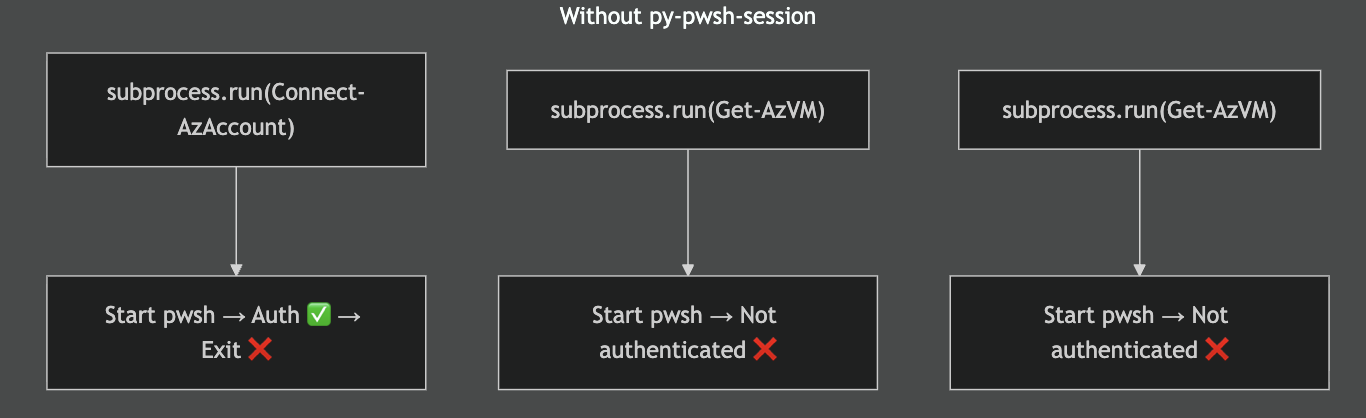
We solved this by implementing persistent PowerShell sessions. Instead of launching a new process for every command, PowerShell is started once and kept alive.

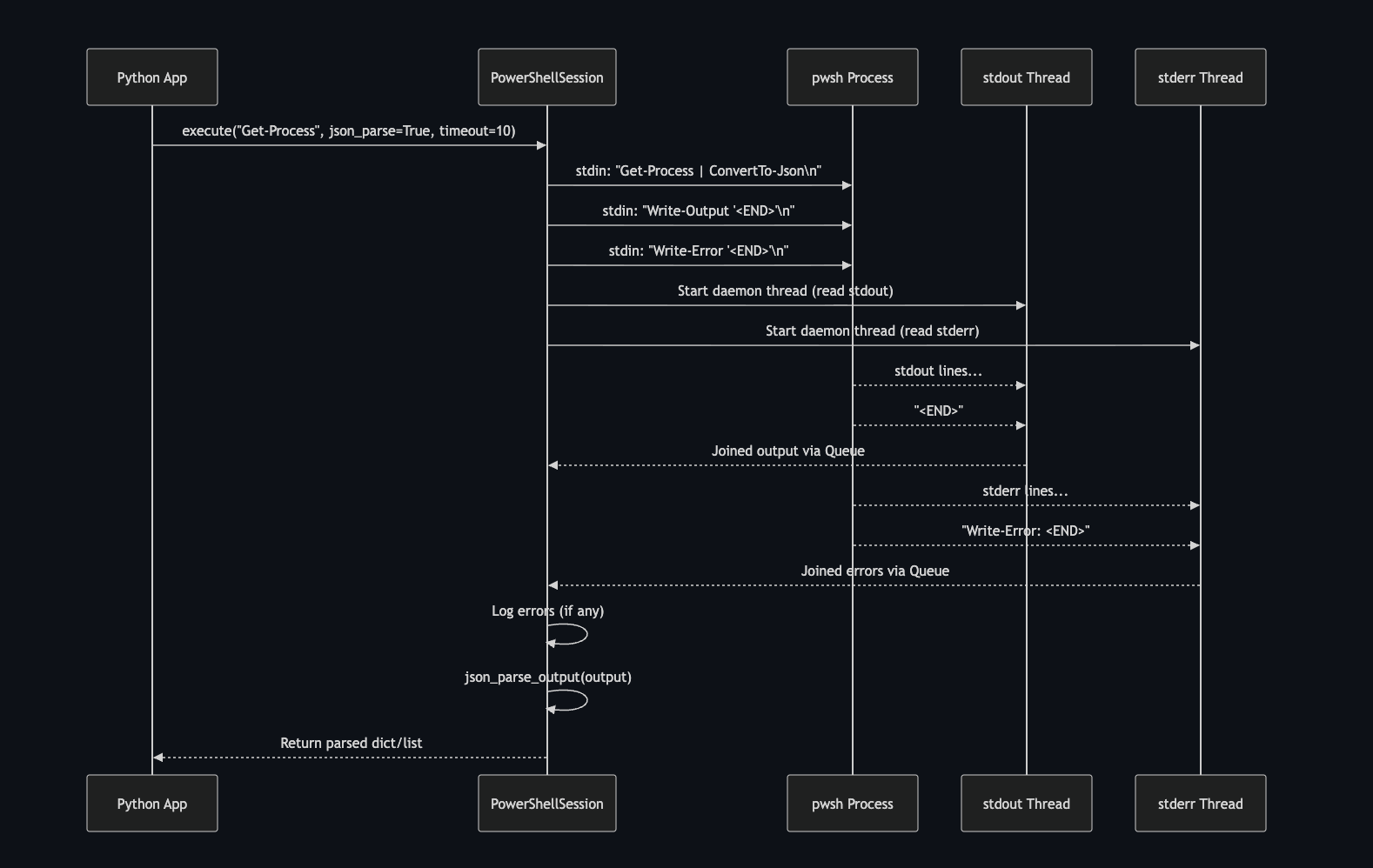
Each execute() call sends commands to the process through stdin, while two background threads continuously read stdout and stderr. To delimit responses, the session writes markers (such as <END>) after each command, allowing the reader threads to know when the output of a command is complete. The results are collected through internal queues, optionally parsed (for example into JSON), and returned to the Python application. This approach preserves authentication across commands while also enabling controlled, programmatic interaction with the running PowerShell process.
Before calling it secure, we did what any security team should do: we tried to break it ourselves.
The Detection & Remediation team organized what we jokingly called “a small CTF”. In reality it wasn’t a CTF at all — just a coordinated effort to see how badly we could break the integration.
And we did manage to break it.
We couldn’t inject commands or spawn a shell, but we discovered that it was possible to malform a query in a way that caused the tool to keep running indefinitely, causing a denegation of service. That finding directly led to the execution timeouts mentioned earlier.
Between those timeouts and the sanitization layers, we were able to close the attack vectors we identified.
In the end, the solution became a hybrid architecture.
We use Microsoft Graph wherever it makes sense, taking advantage of the official and recommended API surface. But for the large portion of configuration and security data that is only accessible through PowerShell, we rely on controlled PowerShell sessions.
This hybrid approach allows Prowler to reach CIS coverage levels comparable to other tools in the ecosystem, while still maintaining a clean and reliable integration.
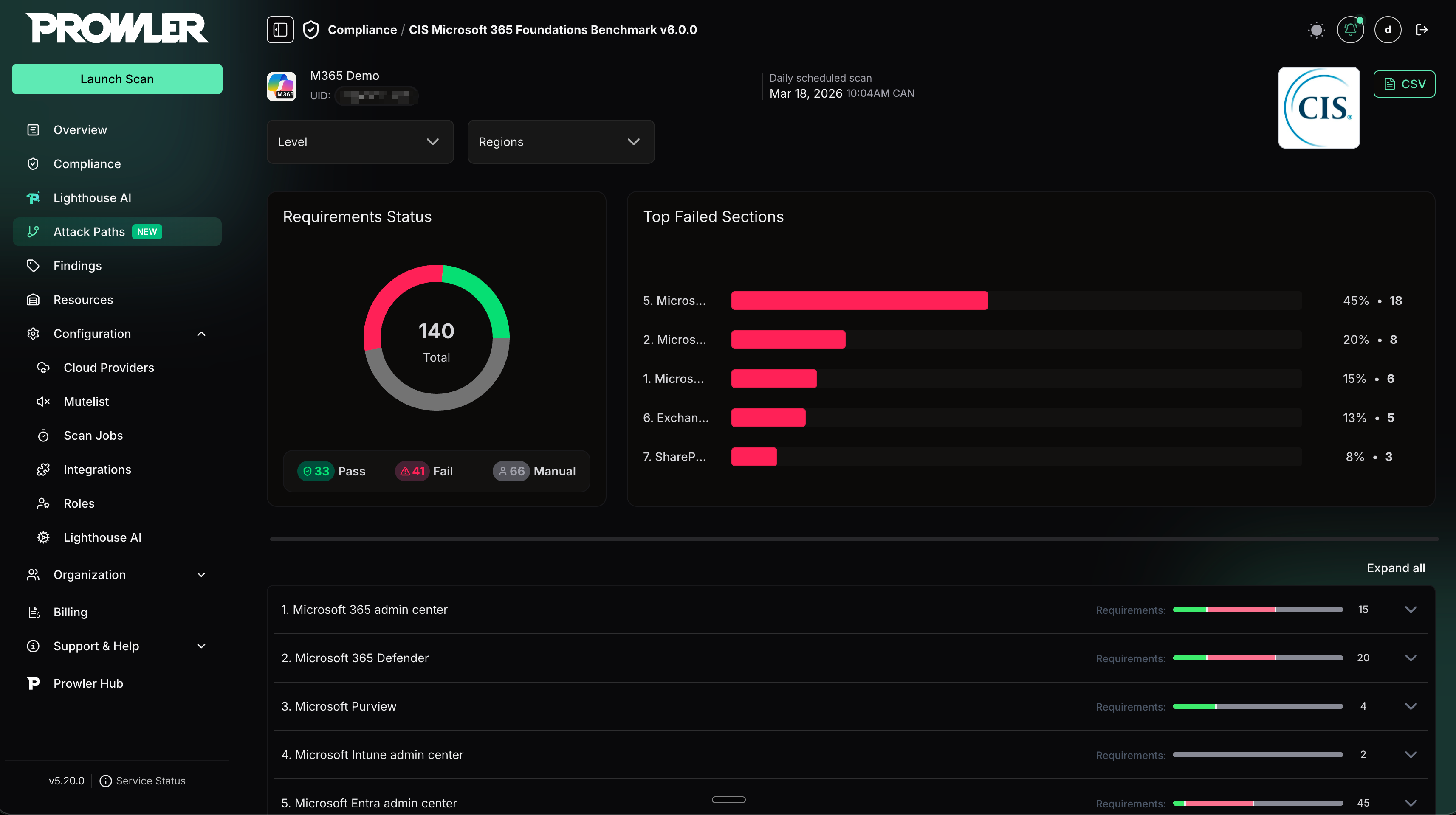
All of this effort had a clear outcome: real Microsoft 365 security coverage aligned with CIS benchmarks.
As commented earlier, with Microsoft Graph alone, we could only cover around 10% of the CIS Microsoft 365 benchmark. By introducing PowerShell, we expanded that potential coverage to all automated CIS controls, unlocking visibility into critical configurations that are simply not accessible through Graph.
At its peak, over 70% of our checks relied on PowerShell, making it the key enabler of this level of coverage. Even today, it continues to power a significant portion of the CIS-aligned checks.
PowerShell Integration is what made meaningful CIS coverage for Microsoft 365 possible.
This is what allows Prowler to deliver:
Interestingly, solving this problem ended up producing something useful beyond the original goal.
By building all of this, we effectively created a secure, consistent, and automatable way to run PowerShell from Python.
At that point we asked ourselves a simple question:
If this took us so much effort to build, why not share it?
The code had always been open source as part of the Prowler repository. However, it lived embedded inside the project, which made it harder for others to reuse it independently.
For a while we had been thinking: why not turn it into a standalone tool that anyone can simply import and use? We had the idea for some time, and we finally found the time to do it.
The result is py-pwsh-session, a fully open-source project released under Apache 2.0, designed to make it easier to execute and manage PowerShell sessions from Python safely and reliably.
The idea is simple: if someone needs to integrate PowerShell into a Python application without compromising security, stability, or maintainability into a Python application, they shouldn’t have to go through all the headaches we went through while building it for Prowler.
Sometimes the technically correct solution isn’t the one that seems like the obvious choice on paper, but if it works reliably in production and helps others solve the same problem, it’s probably worth sharing.
