
.avif)

.avif)



AWS
·
January 16, 2026



Guest post from Chris Farris, security consultant and AWS Security Hero.
Prowler is one of those open-source tools that's been around long enough to have earned real credibility in the cloud security community. The open-source version has been a staple of security assessments for years. The problem is: you run it, you get a pile of findings, you wonder what to do next. Prowler Cloud, their SaaS offering, takes that same engine and wraps it in a proper multi-account, continuous scanning platform that actually makes sense for organizations running more than a handful of accounts across multiple cloud providers.
This post is aimed at the mid-sized org that's been heads-down building things in AWS and maybe hasn't had the bandwidth or a dedicated security team to really audit what they've built. You know the type: 20-50 AWS accounts, a mix of prod and non-prod environments, GuardDuty is probably on, but nobody's looked at their security posture holistically in a while. Prowler Cloud is a reasonable way to change that, and this walkthrough will take you from initial setup across your entire AWS Organization through the process of making sense of what you find and building a sustainable remediation practice. While this example is focused on AWS, the methodology applies to Google and Azure too.
The good news is that Prowler Cloud now includes the ability to set up your entire AWS organization. You deploy the role in the Organization Management account (or any Delegated Admin account that can list all the accounts), and it will create all the cloud providers for each account in your organization.
You'll first want to login to your AWS Organization's Management (aka "payer") Account.
Get started with Configuration -> Cloud Providers -> and the Add Providers button in the upper right. Select "Amazon Web Services" and then select "Add Multiple Accounts with AWS Organizations". Next, you'll need your Organization ID, which can be found in the AWS Console or with:
chris@Mac$ aws organizations describe-organization --query Organization.Id --output text
o-p9udkdfazr
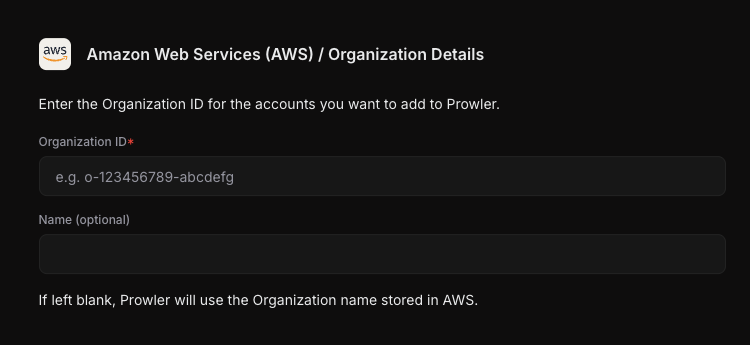
Now you'll need to deploy the CloudFormation template that will push the roles into every AWS account. While you can scope Prowler to a subset of your accounts, threat actors don't care if a misconfiguration is in production or non-production, so I recommend deploying in every account.
Obtain the Root ID from the AWS Console, or via this command executed against your top-level account:
chris@Mac$ aws organizations list-roots --query Roots[].Id --output text
r-mlz5
Leave "I'm deploying from a Delegated Administrator Account (not the Management Account)" unchecked, and click the "Create Stack in Management Account". If you're working with someone on your cloud team, you can share to them this link and they can proceed from here. Prowler Cloud has already pre-populated the parameters you need,
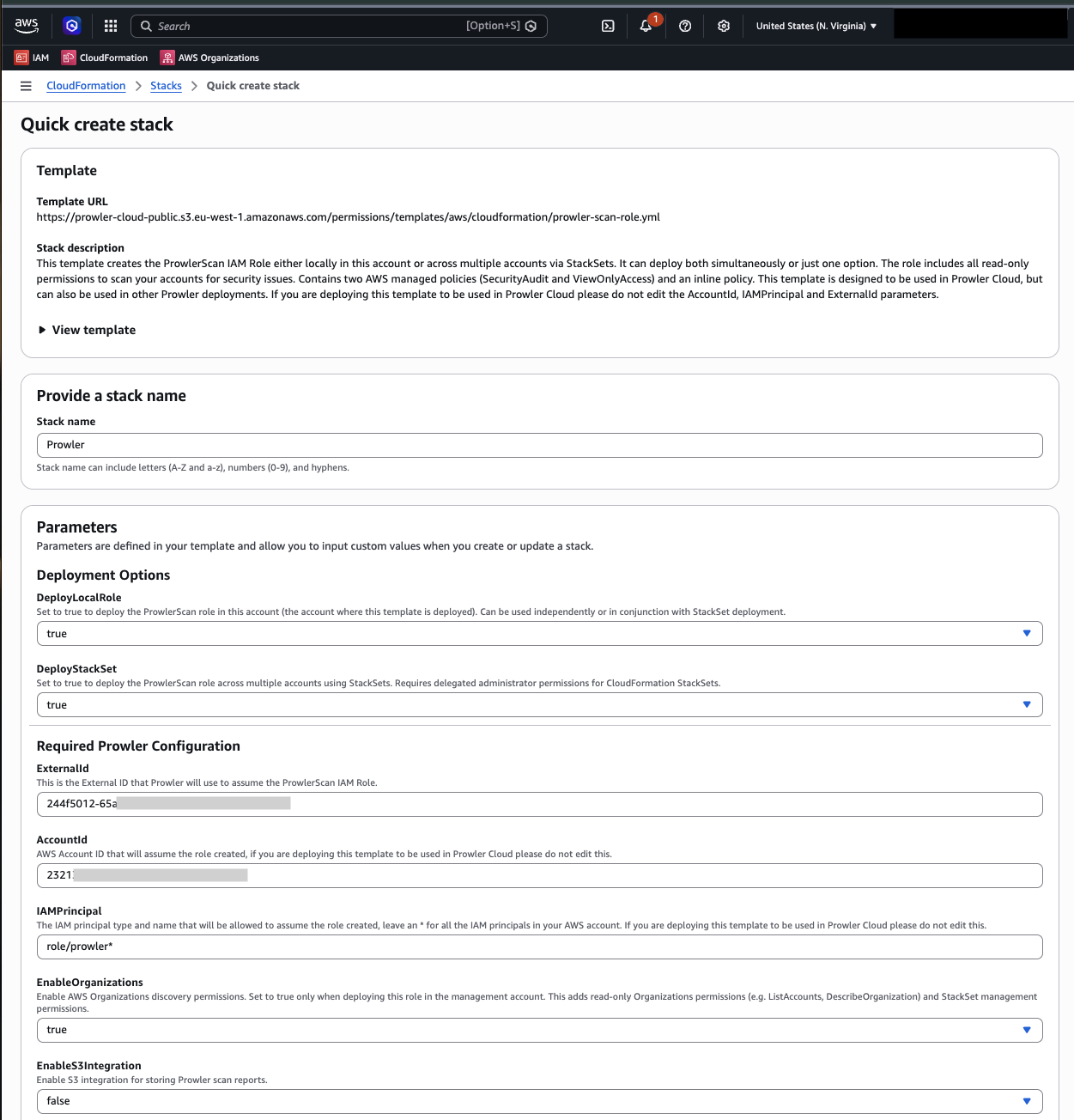
Make sure to check the "I acknowledge that AWS CloudFormation might create IAM resources with custom names." and then Create Stack.

Once the stack is created, head over to the Outputs tab, grab the LocalProwlerScanRoleArn, and enter that back into the "Management Account IAM Role ARN" on the Prowler page. Click Authenticate. You'll see a list of all of your accounts. If you want to remove any from scanning, now is your chance. Once that's done click "Test Connections". Then schedule when you want your daily scan to run, and if you're ready check the "Launch an initial scan now for immediate findings".
Once saved, Prowler will start scanning your environment. Grab lunch and come back in a bit to see the results.
Welcome back. Now that you have some scan results, let's look at the overview.
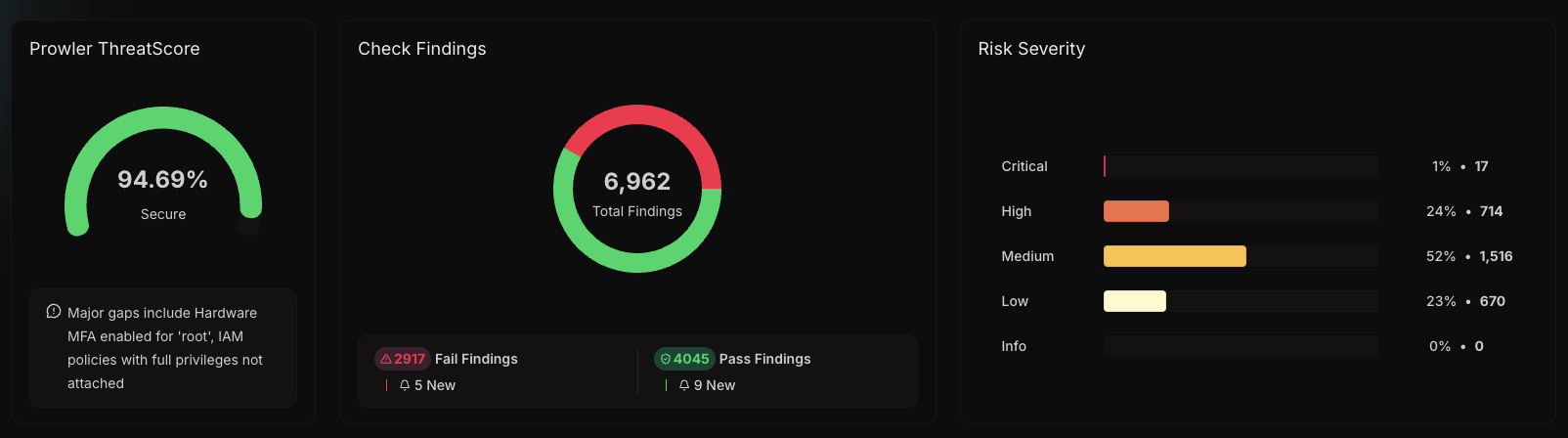
95% score isn't terrible, but you've still got 2900 findings to fix. Luckily, many of these are false positives and can be fixed with some good tuning. So rather than despair, we're going to set up a mutelist for some known issues and accepted risks.
What's a mute list? It's Prowler's way of suppressing findings that don't apply to your organization or things you know you won't fix. You can find the mutelist under Configuration in the left-side navigation.
There are two ways to mute the findings. You can mute the finding individually, and we'll do that in a bit, but there is also the global mutelist, defined in a YAML file. If you click the Advanced tab, you'll see the YAML-based mute list.
By default, a new Prowler organization has a mutelist that suppresses false positives for the unfortunate souls who have Control Tower. You can find that file in the Prowler GitHub Repository. If you're using Control Tower, you want to start with their example. Otherwise, you can start with their file or build your own. Here is a sample mutelist for an organization that's not leveraging all the AWS security tools:
You can define suppressions for all accounts or by using a specific account using its 12-digit account ID. You can specify specific regions. Each mute uses the check_id as the key which you can find under the finding itself.
You then want to grab the Resource Name (highlighted in red)
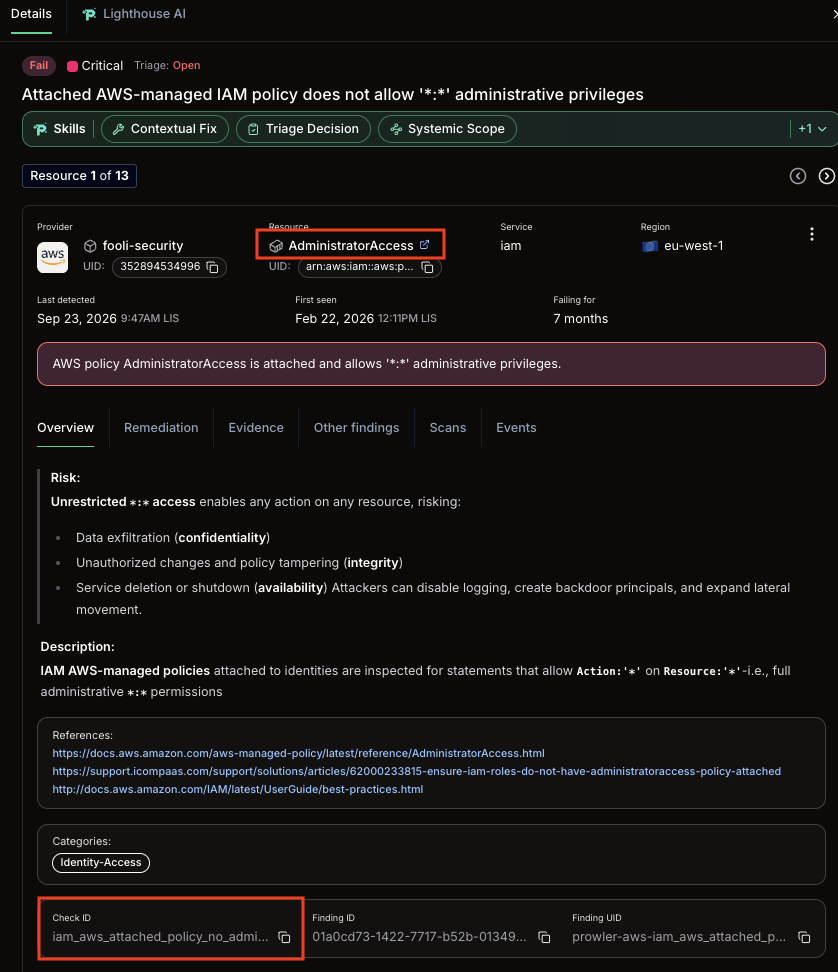
You can also disable an entire check if it's not applicable to your organization with the following:
# GuardDuty not approved by finance
"guardduty_*":
  Regions:
    - "*"
  Resources:
    - "*"
Leveraging the mutelist is a great way to cut out the noise before you start digging into the meaningful risks. In my test organization with 14 accounts, I have 452 distinct GuardDuty findings. By suppressing all of them in my mute list, I can start filtering the noise from the real risks.
I recommend maintaining your Mutelist in revision control and pushing it to Prowler whenever it changes. You can keep comments explaining why you've muted a finding or a set of findings, and you'll have a paper trail of who made what changes.
The mutelist will apply to new findings. Once you've built your mutelist, come back tomorrow to see how much noise has been filtered out.
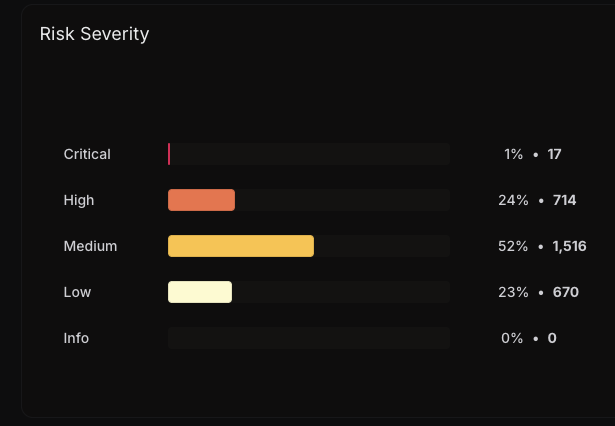
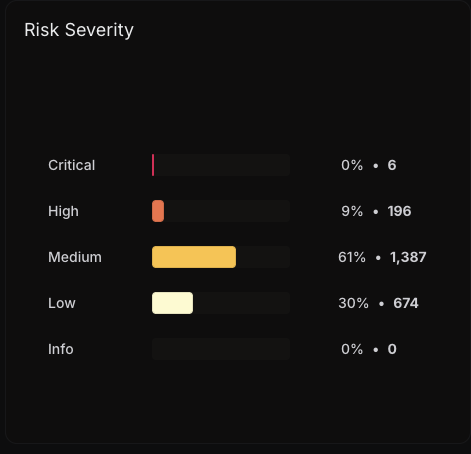
Using the mutelist, we've reduced the number of critical findings from 17 to 6 and the number of High findings from 714 to 196. That almost seems like a digestible number of findings.
Staring at thousands of Prowler findings for the first time is overwhelming. It's easy to look at that list and conclude the situation is hopeless, that there's no way to make a dent, and that maybe it's better just to close the tab and pretend you never looked. Don't do that.
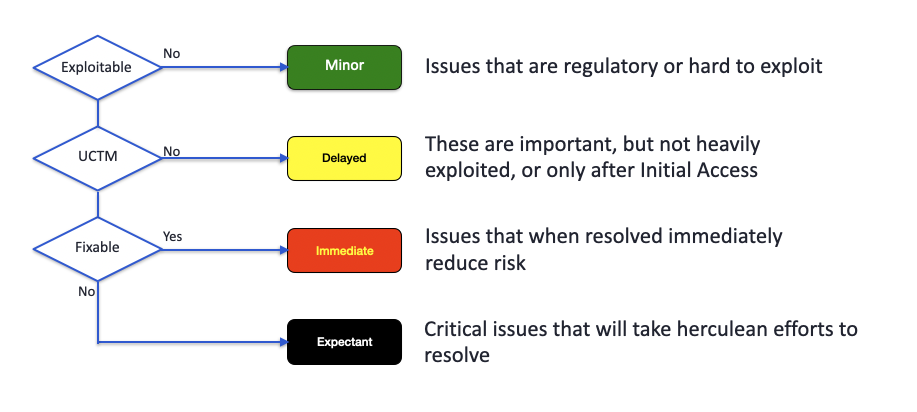
A few years ago, Rich Mogull and I gave a talk at RSAC about how to survive a "pandemic" of cloud security findings. We borrowed a framework from real-world disaster triage, the START protocol, which emergency responders use when victims vastly outnumber available resources. The core insight is that not everyone gets the same treatment. Triage isn't about giving up; it's about applying limited resources where they'll have the most impact.
The same logic applies to your Prowler findings.
Minor: These are regulatory or compliance findings or issues that are genuinely difficult to exploit in practice. They're real findings, and if your threat model includes auditors, they matter. But they don't meaningfully change your risk posture today. Note them, track them, and come back to them later.
Delayed: These findings are important, but they're not the low-hanging fruit an attacker will grab first. They typically require an attacker to have a foothold in your environment already, then use that foothold for privilege escalation or lateral movement after initial access. Worth fixing, but not at the expense of more urgent work.
Immediate: This is your to-do list for this week. These are exploitable issues that can be fixed quickly and will measurably reduce your risk the moment they're resolved. This is where your energy goes first.
Expectant: This is the hard category. In disaster triage, these are victims whose injuries are so severe that treating them in a mass casualty event would consume resources needed to save others. In cloud security, these are your deeply systemic issues. Architectural decisions baked into your infrastructure that will require significant engineering effort to unwind. They absolutely need to be fixed eventually, but if you focus all your energy here while leaving dozens of easily-exploitable issues open, you're making a bad trade. Put these on the roadmap and come back to them once you've cleared the Immediate pile.
The goal isn't to fix everything at once. The goal is to stop the bleeding, reduce your meaningful risk exposure, and build momentum, because a security program that makes steady progress beats one that gets paralyzed trying to boil the ocean.
Risk Severity is a good way to start looking at the issues you want to address. Let's look at our six critical findings:
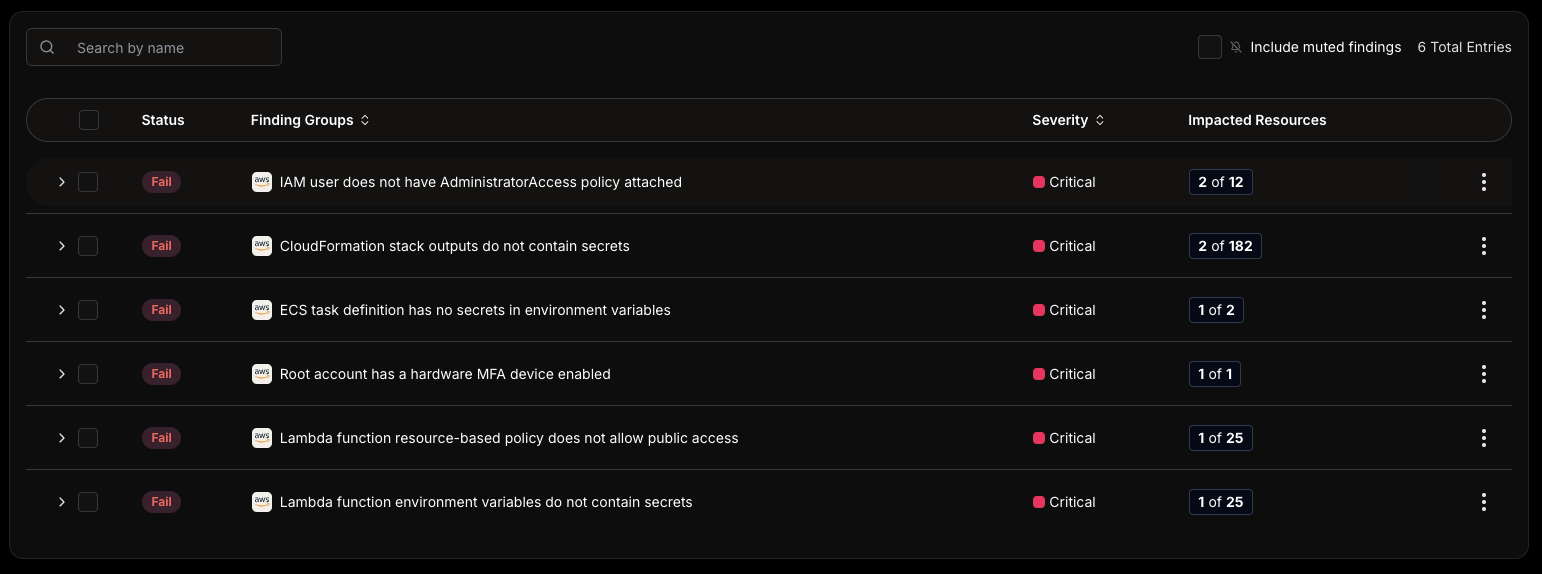
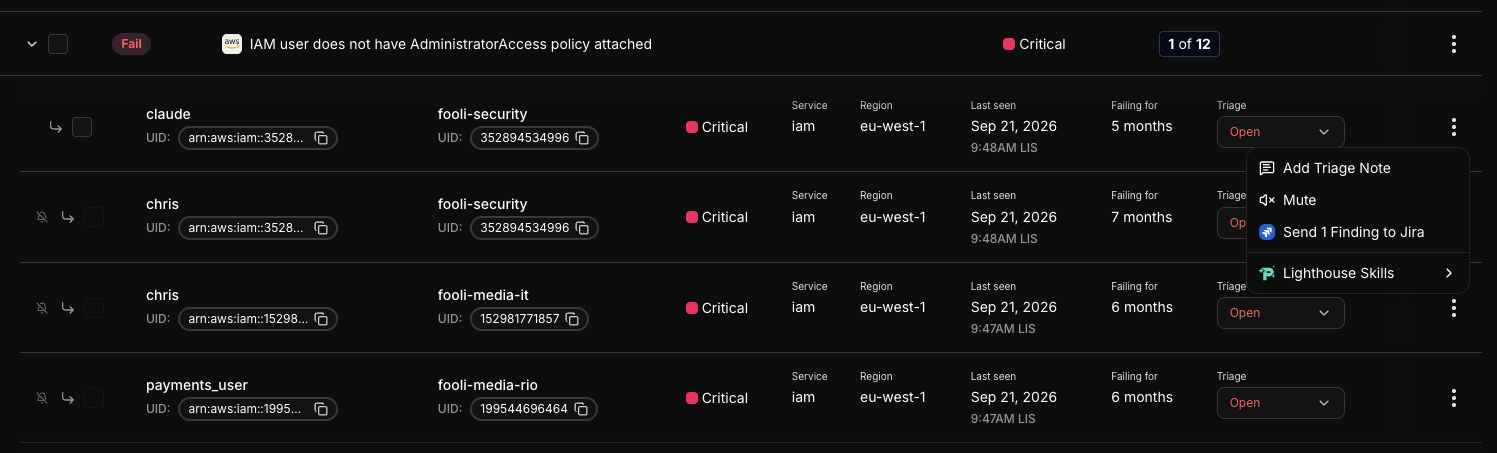
This is somewhat addressable. We have some IAM Users with full admin, missing MFA for root, and some detected secrets.
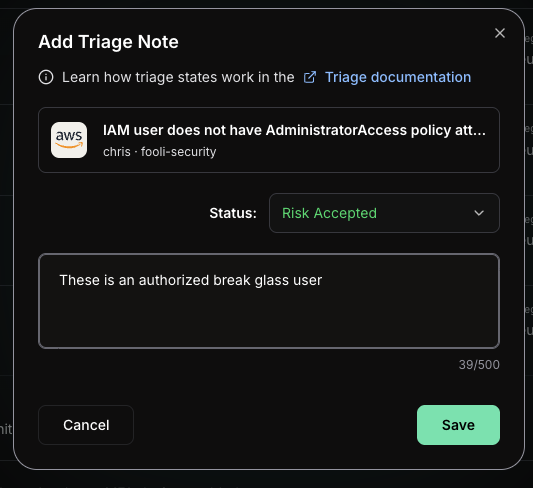
When I dig in, I see they are my break-glass users in case there is an issue with AWS Identity Center. We can triage those. But it turns out that one of the users was unauthorized and has been deleted. You just need to select the findings, click triage, and select a reason (in this case "Risk Accepted"). Keep the reasons something you can give to an auditor.
Everything above is about getting a handle on findings from one cloud. That's the first day. Prowler Cloud carries the same open-source engine into a lot of other places, and once you've cleared the immediate pile it's worth knowing what else is sitting in the platform. Here's the short version of each, with links to the docs to go deeper.
Severity tells you how bad a single finding is in isolation. It doesn't tell you that a public EC2 instance, an over-permissioned instance role, and a writable S3 bucket add up to a path an attacker can actually walk. Prowler's attack path analysis builds a graph of your cloud resources and the relationships between them, then surfaces the privilege escalation and lateral movement chains those relationships create. The point is to sharpen the "Immediate" pile: a medium finding that completes an exploitable chain often deserves your attention before a high that sits on its own. We'll go deep on this in the next post. Docs: Attack Paths.
The cheapest finding to fix is the one that never ships. Prowler's Infrastructure as Code provider scans your Terraform, CloudFormation, Kubernetes manifests, Dockerfiles, and ARM templates for the same classes of misconfiguration it would catch at runtime, except it does it against the files in a pull request before anything is deployed. Wire it into CI and a misconfigured security group or an unencrypted bucket gets flagged on the PR instead of showing up in next week's scan. Docs: Getting started with the IaC provider.
Prowler Cloud is the managed platform, but the engine underneath it is the open-source Prowler CLI, and that engine is fully yours to drive. You can run targeted scans by check, service, severity, or compliance framework. Docs: Prowler CLI
With --push-to-cloud you can send findings from a CLI scan straight into Prowler Cloud, so a scan you run locally or in CI lands in the same place as everything else and picks up the same tracking and remediation workflow.
Most teams reading this don't have a dedicated cloud security analyst on call. Lighthouse AI is a chatbot that fills some of that gap: you ask in plain English ("what are my highest-risk findings?", "show me every S3 bucket with public access") and it answers against your actual scan data, explains the risk, and walks you through remediation. Two things worth knowing up front: it can only see the data your own account can see, and it cannot change your cloud, it has no tools to modify resources even if the underlying credentials could. You bring your own model, with OpenAI, Amazon Bedrock, and OpenAI-compatible endpoints all supported. Docs: Lighthouse AI.
Lighthouse AI is included in Prowler Cloud.
A raw count of 2,900 findings is hard to report up and harder to trend. Prowler ThreatScore collapses your posture into a single 0-to-100 number, but it's not a naive pass percentage. The calculation weighs four things per requirement: the pass rate, the amount of evidence behind it (more findings, more confidence), a business-importance weight, and a risk level. Requirements are grouped into four pillars, IAM, Attack Surface, Logging and Monitoring, and Encryption, so the score tells you not just where you stand but which part of your posture is dragging it down. It's the number you put in front of leadership and watch move month over month. Docs: Prowler ThreatScore.
The walkthrough above used AWS, but the methodology isn't AWS-specific, and neither is Prowler. The same platform scans Microsoft Azure, Google Cloud, Oracle Cloud, and Kubernetes, and it reaches past IaaS into the SaaS and identity layer where a lot of real exposure now lives: Microsoft 365, Google Workspace, GitHub, Okta, MongoDB Atlas, Cloudflare, and more. One posture management platform across all of it means you triage findings the same way regardless of where the resource happens to run. Docs: Supported providers.
Findings are one view of your posture; auditors want another. Prowler maps its checks to a long list of frameworks, more than 40 for AWS alone, including CIS Benchmarks, PCI DSS 4.0, SOC 2, ISO 27001, HIPAA, the NIST CSF and 800-53, FedRAMP, GDPR, NIS2, and ENS, among others. The same scan that feeds your triage queue also produces a per-framework compliance view, so the mutelist entries you documented for risk acceptance and the controls an auditor asks about come out of one source of truth instead of a separate spreadsheet exercise. Docs: Compliance overview.
If your team has started living inside AI assistants and agents, Prowler meets you there. The Prowler MCP server (Model Context Protocol) exposes the platform, findings, compliance state, mutelists, attack paths, to any MCP-capable client like Claude or an agent you've built yourself, through a managed endpoint at mcp.prowler.com with no install required. It's also the layer Lighthouse AI talks to under the hood, which means anything Lighthouse can do, your own agents can do too. The remote MCP server is included with your Prowler Cloud plan, so your assistants and agents can call it with an API key and no extra setup.
Docs: Prowler Cloud MCP.
Getting Prowler Cloud or Prowler Private Cloud set up across your cloud accounts is the easy part. The harder work is figuring out how to act on what it finds, and to keep acting on it over time. The triage framework above gives you a way to start that without getting paralyzed. Fix the immediate issues, mute the findings you've formally accepted, and put the systemic problems on a roadmap for future remediation.
A mutelist is not a list of things you're ignoring. It's a documented record of conscious risk acceptance, which is exactly what auditors want to see and what your future self will thank you for during next year's PCI audit. The finding you deliberately suppressed with a comment is in a completely different category than the one that sat open for three years because nobody looked.
The goal coming out of this first pass isn't a perfect score. It's a clear picture of where your meaningful risk actually lives, and a process you can run again next month.
In the next post, we'll look at Prowler's attack path analysis features, which take this a step further. Rather than triaging findings by severity alone, attack paths let you see which misconfigurations are actually chained together in ways an attacker could exploit, giving you a much sharper signal for what belongs in the "Immediate" pile versus what can safely wait.

