.avif)

.avif)


Tips and Tricks
·
September 29, 2025



Your compliance posture usually lives behind a dashboard. You log in, pick a framework, stare at a donut chart, click into a requirement, click into a finding, copy a resource ID, and then you start fixing things.
What if you could skip the clicking and just ask your agent — from your terminal or wherever it runs; that’s the magic of being fully agentic:
“Am I CIS-compliant, and what exactly is failing?”
That’s what the Prowler Cloud MCP Server unlocks. It plugs your Prowler Cloud account straight into an AI assistant like Claude Code, so compliance becomes a conversation grounded in your real scan data, not a generic LLM guess.
CIS isn’t an AWS-only story either. Prowler Cloud maps the CIS Benchmarks across 9 of its providers, from the big clouds (AWS, Azure, GCP, Oracle Cloud, Alibaba Cloud) to Kubernetes, Microsoft 365, Google Workspace, and GitHub. The same flow works wherever your workloads live. In this post we’ll go end-to-end: connect the MCP, point it at a provider, pull a full CIS Benchmark overview, drill into the failed requirements, and get requirement-level remediation, all without leaving Claude Code.
The MCP authenticates to the Prowler API with a personal API key.
pk_, and that prefix matters because the MCP validates it.Treat it like a password: it can read every finding in your tenant.
Prowler runs a managed server at https://mcp.prowler.com/mcp. There’s nothing to install and you always get the latest tools: Claude Code connects to it directly over HTTP. Full setup details live in the Prowler MCP docs: https://docs.prowler.com/getting-started/products/prowler-mcp. (If you’d rather drive Prowler from a purpose-built plugin, see Automate security workflows inside Claude Code with the Prowler plugin. This post uses the raw MCP so the flow is identical in any MCP client.)
Add it with one command, passing your API key as a Bearer token:
claude mcp add --transport http prowler https://mcp.prowler.com/mcp \
  --header "Authorization: Bearer pk_YOUR_API_KEY_HERE"
Prefer config files? The same thing in .mcp.json (project scope) or ~/.claude.json (user scope):
{
  "mcpServers": {
    "prowler": {
      "type": "http",
      "url": "https://mcp.prowler.com/mcp",
      "headers": { "Authorization": "Bearer pk_YOUR_API_KEY_HERE" }
    }
  }
}
Keep the "type": "http" field: an entry with a url but no type is read as a stdio server and skipped. Swap in your real pk_... key.
Confirm the server is up:
/mcpYou should see prowler connected, exposing four tool namespaces:
prowler_* — Your data: findings, providers, scans, complianceprowler_cloud_* — Hosted-only Cloud ops: alerts, finding triage, scan configsprowler_hub_* — Knowledge base: 2,000+ checks, 70+ framework mappingsprowler_docs_* — Search the official Prowler documentationEverything downstream needs a provider or scan reference. Let Claude fetch it:
You: List my Prowler providers.
Claude calls prowler_search_providers and comes back with whatever you have connected, across clouds:
AWS         · 123456789012 (production)     → id: 4f1c…  · last scan: completed 2h ago
Azure       · prod-subscription             → id: 7d02…  · last scan: completed 3h ago
GCP         · my-gcp-project                → id: 9ab3…  · last scan: completed 1h ago
Kubernetes  · prod-cluster                  → id: b6e8…  · last scan: completed 5h ago
Grab the id of the provider you care about. Every provider has its own CIS Benchmark; pick the framework ID that matches:
cis_7.0_awscis_6.0_azurecis_5.0_gcpcis_7.0_m365cis_1.12_kubernetescis_3.1_oraclecloudcis_2.0_alibabacloudcis_1.3_googleworkspacecis_1.0_githubYou won’t need to memorize scan IDs, since the compliance tools accept a provider_id and automatically resolve to its latest completed scan.
Now the good part. Ask for the big picture on any provider. We’ll use the AWS account here, but the flow is identical for the rest:
You: Give me the compliance overview for provider 4f1c….
Claude calls prowler_get_compliance_overview, which returns a high-level, all-frameworks posture for that scan, not just CIS. You get summary stats plus a per-framework pass/fail breakdown:
Compliance overview — scan 8d22… (AWS 123456789012)

Framework            Pass    Fail    Manual   Coverage
------------------   ----    ----    ------   --------
cis_7.0_aws           142      37        9      ~79%
pci_4.0_aws            98      21       44
iso27001_2022_aws      74      12       31
soc2_aws              120      15       61
This alone answers the executive question, “where do we stand?”, across every framework Prowler mapped, straight from your latest scan. Copy the exact framework ID you want to dig into (here, cis_7.0_aws) from this output; that’s the ID the next tool expects.
CIS is just our example. prowler_get_compliance_overview returns every framework in the scan, and the next tool accepts any of those framework IDs. The exact same flow works for all 70+ compliance frameworks Prowler supports, PCI-DSS, SOC 2, ISO 27001, HIPAA, NIS2, GDPR, DORA, ENS, and the rest. Swap cis_7.0_aws for pci_4.0_aws, iso27001_2022_aws, or hipaa_aws and everything below behaves identically.
You: Show me the failed CIS requirements for that provider, use cis_7.0_aws.
Claude calls prowler_get_compliance_framework_state_details with the framework ID. This tool is deliberately focused: it returns the failed requirements and, for each, the specific failed finding IDs behind them.
CIS 7.0 AWS — failed requirements (scan 8d22…)

▸ 2.1.1  Ensure S3 Bucket Policy is set to deny HTTP requests
    3 failing findings → f2a1…, f2a2…, f2a9…

▸ 3.1    Ensure CloudTrail is enabled in all regions
    1 failing finding → c7b0…

▸ 5.2    Ensure no security groups allow ingress from 0.0.0.0/0 to port 22
    6 failing findings → d3e4…, d3e5… (+4 more)

▸ 5.4    Ensure the default security group restricts all traffic
    2 failing findings → a9f1…, a9f2…
No donut chart to click through: you get the requirement text, the count, and the exact findings you need to open next, all in one message. Point the same tool at cis_6.0_azure or cis_5.0_gcp and you get the equivalent breakdown for that cloud.
Take any finding ID from the previous step and ask for the details:
You: Explain finding d3e4… and how to fix it.
Claude calls prowler_get_finding_details and returns the affected resource, region, severity, and the remediation guidance Prowler ships for that check. Want to see the exact remediation logic Prowler recommends? The Hub namespace has it:
You: Show me Prowler’s fixer for the check behind d3e4….
prowler_hub_get_check_fixer returns the auto-remediation script for that check when one exists (not every check has one). It’s a great reference for what “restrict SSH ingress” means at the API level before anything touches your account.
This step is entirely optional. Everything up to here is read-only: you now know exactly what’s failing and why. Plenty of teams stop at Step 6 and hand the findings off to their normal workflow (see the Jira option in Step 8). Only reach for this if you want the agent to touch your cloud, and you’re comfortable with the guardrails at the end of the post.
If you do want it, here’s the part that makes this more than a read-only dashboard. Remediation doesn’t have to go through the MCP at all. The MCP found the gap; the fix is just an API call to your cloud, and Claude Code can make it directly.
Claude Code already runs with your local credentials, the same AWS profile your aws CLI and Terraform use. So once it knows the resource and the fix, you can just ask:
You: Fix finding d3e4…. Show me the exact change first, then apply it with my prod AWS profile.
Claude proposes the concrete change and waits for your go-ahead:
Finding d3e4… → security group sg-0a12b34c (eu-west-1)
  Inbound rule: 0.0.0.0/0 → tcp/22  (CIS 5.2 violation)

Proposed fix:
  aws ec2 revoke-security-group-ingress \
    --group-id sg-0a12b34c \
    --protocol tcp --port 22 --cidr 0.0.0.0/0 \
    --profile prod --region eu-west-1

Apply? (y/n)
Approve it and Claude runs it. Manage your infra as code? Point it there instead and it stays durable:
You: Don’t touch the account directly. Find where sg-0a12b34c is defined in my Terraform, remove the 0.0.0.0/0 SSH rule, and run terraform plan.
Claude greps the repo, edits the .tf, and shows you the plan. Same fix, but now it won’t silently drift back on the next apply. That’s the honest advantage of the agent over a one-shot fixer script: it can reason about your setup and remediate in whatever form your environment actually uses. (If you’d rather Prowler drive the remediation itself, see Prowler Autonomous Fixer: Guided Remediation for Cloud Misconfigurations.)
You can also let it work the list instead of one finding at a time:
You: Walk through every failing CIS 5.2 finding. For each, show the fix and ask me before applying.
If you applied a fix in Step 7, confirm it actually landed. A fix you can’t verify isn’t a fix:
You: Trigger a new scan on this provider, then show me CIS 5.2 again.
Claude kicks off a fresh scan with the prowler_* scan tools, waits for it to complete, and re-runs prowler_get_compliance_framework_state_details. The requirement flips from failed to passing, backed by a new scan, not by your say-so.
If you skipped Step 7, hand the findings off to your team instead. The MCP does that too:
You: Open Jira tickets for every failing CIS 5.2 finding.
That’s prowler_send_findings_to_jira turning failed findings into work items through your Jira integration. Either way, you go from “am I compliant?” to a tracked, actionable answer.
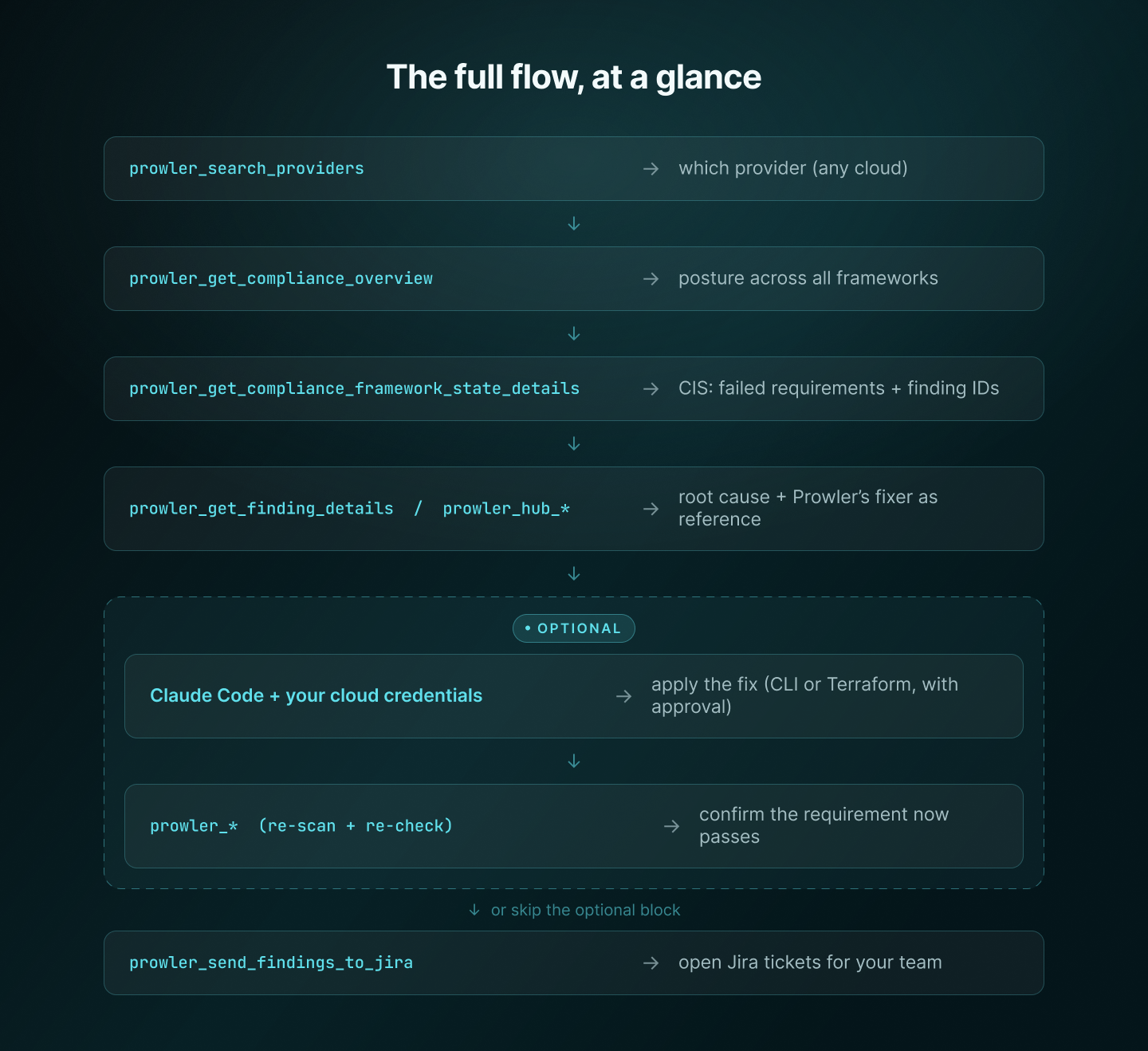
The MCP is the eyes. Discovery is read-only and stops wherever you want; when you choose to remediate, Claude Code with your credentials becomes the hands. One conversation, from “am I compliant?” to either a verified fix or a tracked ticket, on whichever cloud you point it at.
.mcp.json; use user-scope config for anything sensitive.--dry-run before anything is applied.The Prowler MCP Server turns compliance from a dashboard you visit into a question you ask. With your Prowler Cloud account on one end and Claude Code on the other, “are we CIS-compliant?” gets answered with your own scan data, requirement by requirement, with the failing findings and their fixes attached, on any cloud you run.
Point it at a provider, ask the question, and let the tools do the clicking.