.avif)

.avif)



What's New
·
August 3, 2026



Okta is a supported provider in Prowler. Point it at your org and it checks your configuration against the DISA Okta IDaaS STIG, so misconfigurations surface before attackers find them.
For years the security perimeter was the network: firewalls, VPNs, the edge of your data center. That perimeter has moved. Today the thing standing between an attacker and your data is usually an identity provider — and for a huge number of organizations, that's Okta. Log into Okta and single sign-on hands you the keys to email, code repositories, cloud consoles, and finance systems. The login page is the front door now.
That makes the configuration of your Okta org one of the most security-sensitive things you own. Not the code, not a server — the settings. A session that never times out, an admin who can sign in without phishing-resistant MFA, an API token that works from anywhere on the internet: each is a quiet open window. None of them throw an error. Nothing breaks. The org keeps working perfectly right up until someone walks through one of those windows.
The problem is that these settings are easy to get wrong and hard to keep an eye on. They live across a dozen screens in the Admin Console, they drift as teams make changes, and "is our session policy still correct?" is not a question anyone enjoys answering by hand every week.
That's what the Prowler Okta provider is for. You point Prowler at your Okta org and it reads your configuration — policies, authenticators, API tokens, network zones — and compares it against a recognized security benchmark. Instead of clicking through screens, you get a clear, prioritized list of findings: what's misconfigured, why it's a risk, and exactly how to fix it. Run it once for a snapshot, or run it continuously to catch drift the moment it happens.

Prowler connects to Okta as a service application using OAuth 2.0 with a private-key JWT — the same machine-to-machine pattern Okta recommends for automation. In plain terms: there's no human login and no password to store, and the connection is strictly read-only. Prowler is granted scopes like okta.policies.read, so it can inspect your configuration but can never change it. The worst it can do is tell you something is wrong.
Each finding maps back to a specific, documented control, so a result isn't one vendor's opinion — it's “this setting doesn't meet this line of this standard,” with a link to the fix.
Prowler's Okta checks are built against the DISA Okta Identity as a Service (IDaaS) STIG, Version 1 Release 2 (benchmark dated 05 Jan 2026). A STIG (Security Technical Implementation Guide) is a hardening standard published by the U.S. Defense Information Systems Agency — essentially a vetted checklist of how a system should be configured to be considered secure.
It's the right backbone for an Okta posture tool for two reasons. If you operate in a federal or regulated environment, STIG compliance may be a hard requirement, and Prowler reports against it directly. And if you don't, the STIG still encodes identity-hardening best practices — session limits, strong authentication, password hygiene, network restrictions — that apply to any organization that wants its identity layer to hold up.
The Okta provider scans across the areas below. Each check verifies one concrete setting and ties to a STIG requirement; here's the shape of the coverage and why each area matters.
| Area | Example checks | Why it matters |
|---|---|---|
| Session policy (Sign-On) | Global session idle timeout (15 min), session lifetime (18h), cookies not persistent, network zone enforced, DoD warning banner | Sessions that live too long or persist across browser restarts are prime targets for takeover of an unattended or hijacked session. |
| Application access | MFA required and phishing-resistant authentication for the Admin Console and the End-User Dashboard; auth-policy network zone enforced | The admin console is the keys to the kingdom. Weak or phishable authentication here turns one stolen credential into full control. |
| Authenticators & password policy | Minimum length (15), complexity (upper/lower/number/symbol), min/max age, history, common-password check, lockout threshold, smart-card and FIPS-compliant Okta Verify | Weak or reused passwords and soft lockout thresholds are still among the most exploited identity weaknesses. |
| API tokens | Tokens restricted to a network zone; tokens not held by a Super Admin | A leaked API token that works from anywhere, or one with super-admin power, is a full bypass of your interactive login protections. |
| Network zones | Block anonymized proxies (e.g. anonymizing VPNs/Tor) | Blocks a common path attackers use to mask origin and evade location-based controls. |
| Logging & lifecycle | System log streaming enabled; automatic deactivation of users after 35 days of inactivity; trusted smart-card IdP using DoD-approved CAs | Without log streaming you can't detect or investigate; dormant accounts are silent attack surface. |
That's 29 checks across the DISA Okta IDaaS STIG today, and the catalog grows as Prowler's Okta coverage expands — all of it browsable in Prowler Hub, a public registry of every check and compliance framework across all providers supported by Prowler, each with its severity, risk write-up, and remediation steps.
To make this concrete, take one check: signon_global_session_idle_timeout_15min.
Default Rule) setting Maximum Okta global session idle time to 15 minutes or less.Every finding follows that same arc — what, why, which control, how to fix — whether you read it in the terminal or in the dashboard.
Prowler Cloud is where this comes together. Okta is now available as a provider, and a guided setup connects your org in minutes — no infrastructure to stand up or maintain. From there Prowler Cloud runs the full program for you: scans on a continuous schedule, every finding in one place to track posture over time, group and triage issues, measure compliance against the Okta IDaaS STIG, and catch drift the moment it appears — across every provider you've connected, identity included. It's the complete platform built for exactly this kind of ongoing assurance, and the experience the rest of this post is designed to lead into.
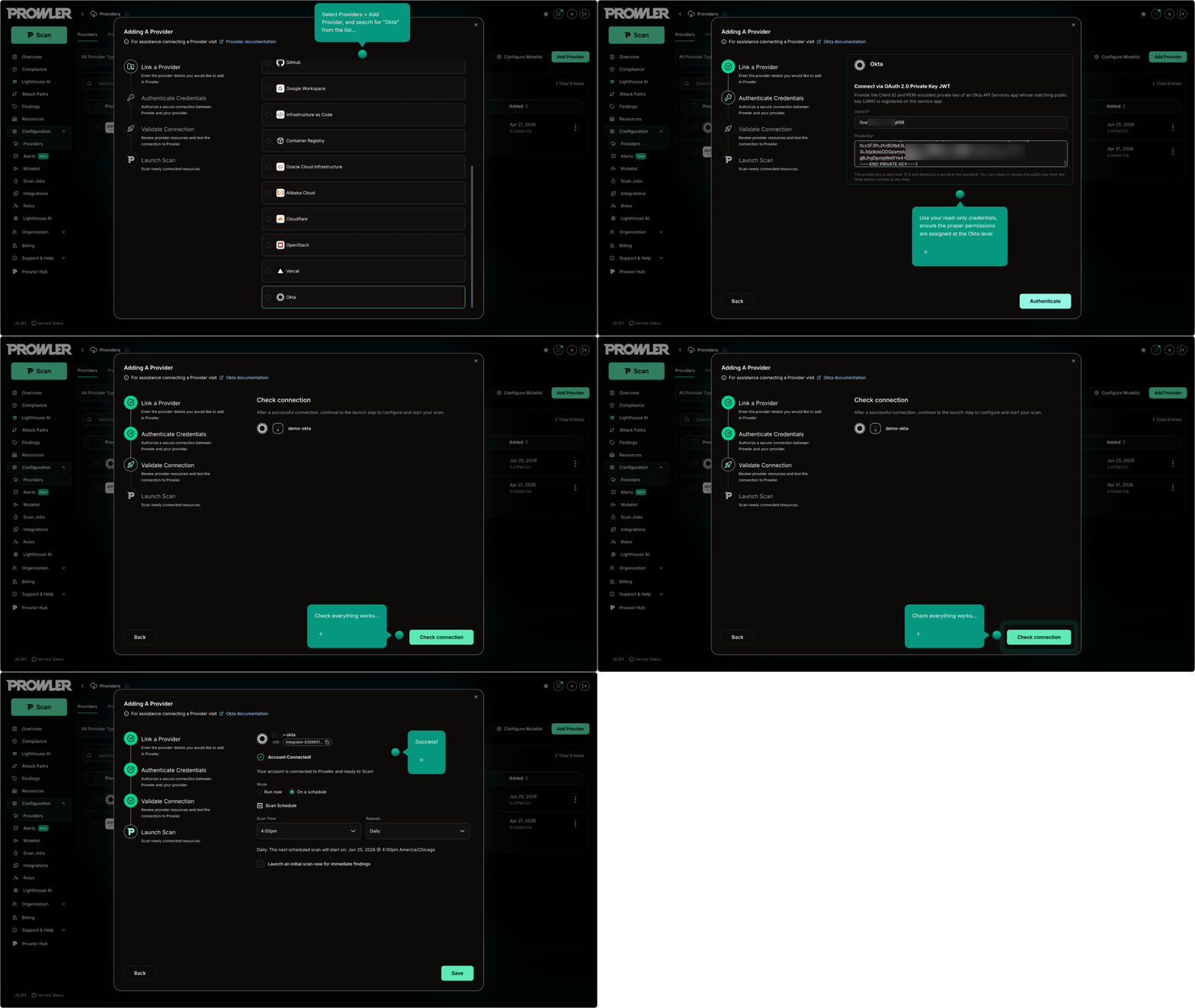
You can also run the checks from the CLI — the same scanning engine, driven locally — and feed the results into Prowler Cloud (more on that below). After creating a read-only API Services app and keypair (see the Okta Authentication guide), export your credentials and scan:
export OKTA_ORG_DOMAIN='acme.okta.com'
export OKTA_CLIENT_ID='0oa1234567890abcdef'
export OKTA_PRIVATE_KEY_FILE='/secure/path/to/prowler-okta.pem'

# Full baseline scan
prowler okta

# Or run a single check
prowler okta --check signon_global_session_idle_timeout_15min
Prowler prints a summary table and writes full findings to your configured output formats. Many teams use both: the CLI in automation, Prowler Cloud as the home base for tracking results over time.
Scanning from the CLI gives you fast answers, but they arrive as text in a terminal. You don't have to stop there. Prowler can push scan output — written in the open OCSF standard — straight into Prowler Cloud, either automatically at the end of a run with --push-to-cloud, or by uploading the results file afterward.
export PROWLER_CLOUD_API_KEY='pk_your_api_key_here'
prowler okta --push-to-cloud
That PROWLER_CLOUD_API_KEY is a Prowler Cloud API key you generate once in your account settings. Once the findings are in, they open up in a full graphical dashboard. Instead of scrolling through console output, you filter by severity, group related issues, click into a finding for its remediation steps, compare against earlier scans to see whether your posture is actually improving, and get alerted when something drifts. It's the difference between reading a static text report and working in a visual console your whole team can navigate — and it's how a one-off CLI scan becomes part of an ongoing program.

Security is shifting from dashboards you read to assistants you talk to, and Prowler is built for that change. Lighthouse AI is a cloud security analyst you interact with in plain language. Ask “Which Okta checks are failing, and which should I fix first?” and it interprets the question, pulls the relevant findings, and answers with context and concrete next steps — no query syntax, no hunting through tables.

Under the hood, Lighthouse AI is powered by the Prowler MCP Server — and that same server is available to your tools. Connect it to an AI assistant like Claude Code, Cursor, or VS Code and your Okta (and wider cloud) posture becomes context the assistant can reason over directly: it can surface misconfigurations, weigh their risk, and even draft or open remediation pull requests, all without leaving the editor.
This is where the optional automation of today's AI-driven era comes in. None of it is mandatory, and you stay in control of what runs and what ships — but as more teams fold AI into how they work, having your identity and cloud security posture available as something an assistant can query and act on turns a periodic checklist into an always-on teammate.
Okta is available now as a provider in Prowler.
Your identity layer earned its place at the center of your security posture. It deserves the same continuous scrutiny as the rest of your stack — and now it can have it.